Before we submitted Limenote 1.0, we went through Apple's App Review Guidelines line by line next to our own privacy policy and our own code. That pass turned up three problems that would almost certainly have meant a rejection, plus a handful of smaller ones. None of them were exotic. They're the kind of thing every indie iOS app runs into, and most of them are invisible until a reviewer points at them.
This is that list, roughly in order of how likely each one is to hit a small team. Each item comes with what we changed. Nothing here is legal advice, and Apple's guidelines change, so check the current text before you rely on any of it.
1. A guest account is still an account
Limenote creates an account for the device on first launch, so nobody has to sign up before they can write. Sign in with Apple is optional and only attaches that existing notebook to an Apple ID.
It's easy to think of that silent account as not really an account. But Guideline 5.1.1(v) is short and doesn't make that distinction:
If your app supports account creation, you must also offer account deletion within the app.
The guest has a user row, a session, documents and files on our server. If the app made it, the person needs a way to delete it from inside the app. We treated our guest account exactly like a signed-in one, and we'd suggest you do the same.
Two details are easy to miss:
- Email doesn't count. "Email us to delete your account" is not in-app deletion. A web page or a support address can be an extra route, but the button has to be in the app.
- Your privacy policy can give you away. The privacy policy URL is a required field, and reviewers read it. Ours originally said to email us for deletion. A reviewer wouldn't even need to open the app to find the problem. Ship the feature first, then rewrite the policy to describe it.
What "delete" has to cover is wider than it sounds. In Limenote it removes the account's documents and files, any guest notebook parked on the device, every session (so the account's other devices are signed out), and the identity rows. On the device it then clears the local copy, the Keychain token and the stored ids, and starts over as a fresh guest.
2. Sign in with Apple: you can only revoke what you kept
If your app offers Sign in with Apple, Apple expects deleting the account to also revoke the user's Apple tokens through its REST API. This is the part most tutorials skip. You can't revoke a token you never had, and the token you need is only available at sign-in.
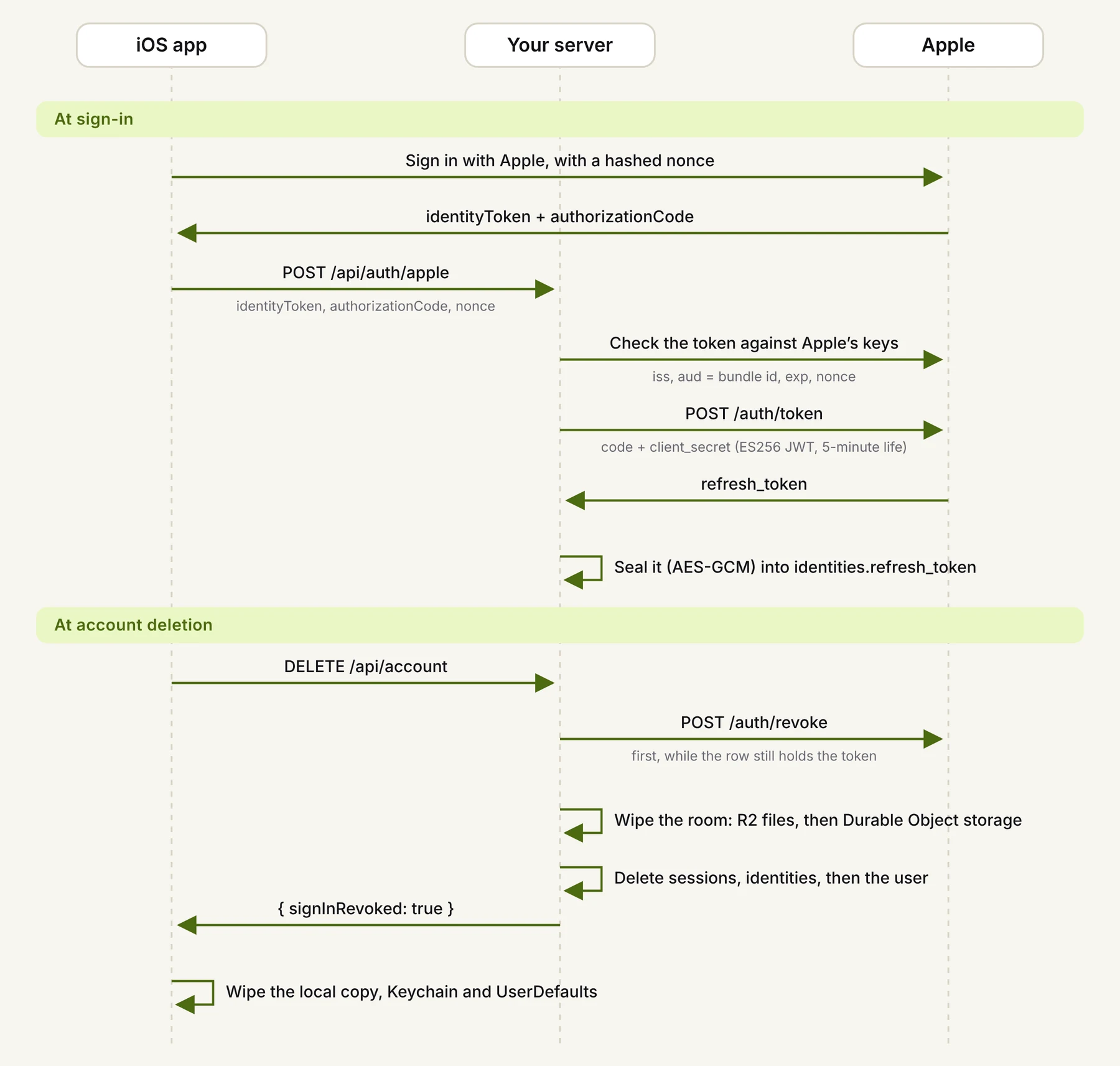
The flow:
- At sign-in, send the authorization code to your server, not just the identity token. The code is single-use and only valid for a few minutes, so exchange it right away.
- Exchange it with
POST https://appleid.apple.com/auth/token. Theclient_secretisn't a static string: it's an ES256 JWT that you sign with a Sign in with Apple key (.p8) from your developer account. - Store the refresh token encrypted. It sits in your database until the account is deleted, so don't keep it in the clear.
- At deletion, revoke first, with
POST https://appleid.apple.com/auth/revoke, while the row still holds the token. Then wipe the data, then delete the rows.
The client secret is the fiddly part. Apple accepts a life of up to six months, but you only need one request's worth:
const header = { alg: 'ES256', kid: KEY_ID };
const claims = {
  iss: TEAM_ID,
  iat: now,
  exp: now + 300,               // five minutes is plenty for one call
  aud: 'https://appleid.apple.com',
  sub: BUNDLE_ID,               // the app's client_id
};
// Sign `${b64url(header)}.${b64url(claims)}` with the .p8 (PKCS#8, P-256, SHA-256).
// WebCrypto returns ECDSA signatures as raw r||s, which is what JWS wants.
Two decisions we'd make again:
- A failed code exchange shouldn't fail sign-in. If Apple's token endpoint is down, the person still signs in. They just won't have a stored token until their next sign-in.
- A failed revoke shouldn't block deletion. We log it and report
signInRevoked: false, but everything else is still deleted. Whether a person can delete their data is not Apple's call to make.
Also keep in mind that this needs three more server secrets (team id, key id, the .p8 itself) and a database column for the token. Put both on your pre-submission checklist, because the code will silently skip the revoke without them.
3. The privacy manifest: ITMS-91053
Since 2024, an app that calls any of Apple's "required reason" APIs has to ship a PrivacyInfo.xcprivacy that names each API and gives an approved reason. If it doesn't, App Store Connect rejects the upload with ITMS-91053 before a human ever sees it.
You almost certainly call at least one: UserDefaults is on the list. Ours declares two:
<key>NSPrivacyAccessedAPITypes</key>
<array>
  <dict>
    <key>NSPrivacyAccessedAPIType</key>
    <string>NSPrivacyAccessedAPICategoryUserDefaults</string>
    <key>NSPrivacyAccessedAPITypeReasons</key>
    <!-- CA92.1: read and written only by this app -->
    <array><string>CA92.1</string></array>
  </dict>
  <dict>
    <key>NSPrivacyAccessedAPIType</key>
    <string>NSPrivacyAccessedAPICategoryFileTimestamp</string>
    <key>NSPrivacyAccessedAPITypeReasons</key>
    <!-- C617.1: files inside the app's own container -->
    <array><string>C617.1</string></array>
  </dict>
</array>
The second one is easy to miss. If you trim an on-device cache by last-used date, you're reading file timestamps. Search your code for what you actually call (disk space, system boot time and active keyboards are the other common ones) and declare only those. A manifest that lists APIs you don't use is just as wrong as one that leaves some out.
The manifest also lists the data types you collect, and the App Privacy answers in App Store Connect have to match it and your policy. A label that says less than your policy describes is its own finding. Our first draft of the label left out two types the policy already mentioned: photos (scans kept as pages) and the user id.
4. Ask before a page goes to an AI provider
If your app sends people's content to a third party, Guideline 5.1.2(i) asks you to say so clearly and get permission first, and third-party AI is explicitly included. In Limenote, a question sends the region you selected to the provider whose key you added. So the iOS app now asks once per provider, on that device, before the first request goes out, and forgets the answer when the key is removed.
Even if your reading of the guideline is more relaxed than ours, this is cheap to build, and it's the honest thing to do.
5. Give the reviewer what the feature needs
If a feature needs a login, a subscription or an API key, the reviewer needs one too. Otherwise they can't test it, and you get a 2.1 "information needed" rejection that costs you a round trip.
Our AI features run on the person's own key, which the app never ships. So the review notes include a working key, with exact steps: Settings › AI › paste the key › Save, then lasso a figure and tap Ask AI. Use a throwaway key with a low spending cap, and revoke it once the review is done.
6. Debug leftovers that look like policy violations
Two things that are harmless while you develop read very differently to a reviewer:
NSAllowsArbitraryLoadsin Info.plist. If you only need it for a local dev server, narrow it toNSAllowsLocalNetworkingand alocalhostexception.- A server switcher that lets a user point the app at any URL. If your privacy policy says data goes to your servers, a text field that sends it anywhere contradicts that. Put it behind
#if DEBUG.
7. Small things that are still worth an hour
- Age rating vs. audience. A 4+ rating, a policy that says the service isn't directed at children under 13, and marketing aimed at students don't sit well together. Pick a rating that matches who you're actually talking to.
- Claims vs. Info.plist. Check every claim in your description and screenshots against the build. For example, don't advertise iPad split view while
UIRequiresFullScreenistrue. - Export compliance. If you only use HTTPS and hashing,
ITSAppUsesNonExemptEncryption = falsesaves you a question on every upload. - The copyright line should name the legal entity exactly as it appears on the developer account.
The checklist
- In-app account deletion, guest accounts included, and a privacy policy that describes it
- Sign in with Apple: authorization code exchanged at sign-in, refresh token stored encrypted, revoked first on delete
- The three Apple secrets and the token column exist in production
PrivacyInfo.xcprivacydeclares exactly the required-reason APIs you call- App Privacy answers match the manifest and the policy
- Explicit consent before content goes to a third-party AI
- Review notes with a working account or key, and the steps to use it
- No arbitrary loads and no user-editable server outside debug builds
- Age rating, screenshots and description match the build
Most of these took us less than a day each. Getting rejected over one of them would have cost a week.