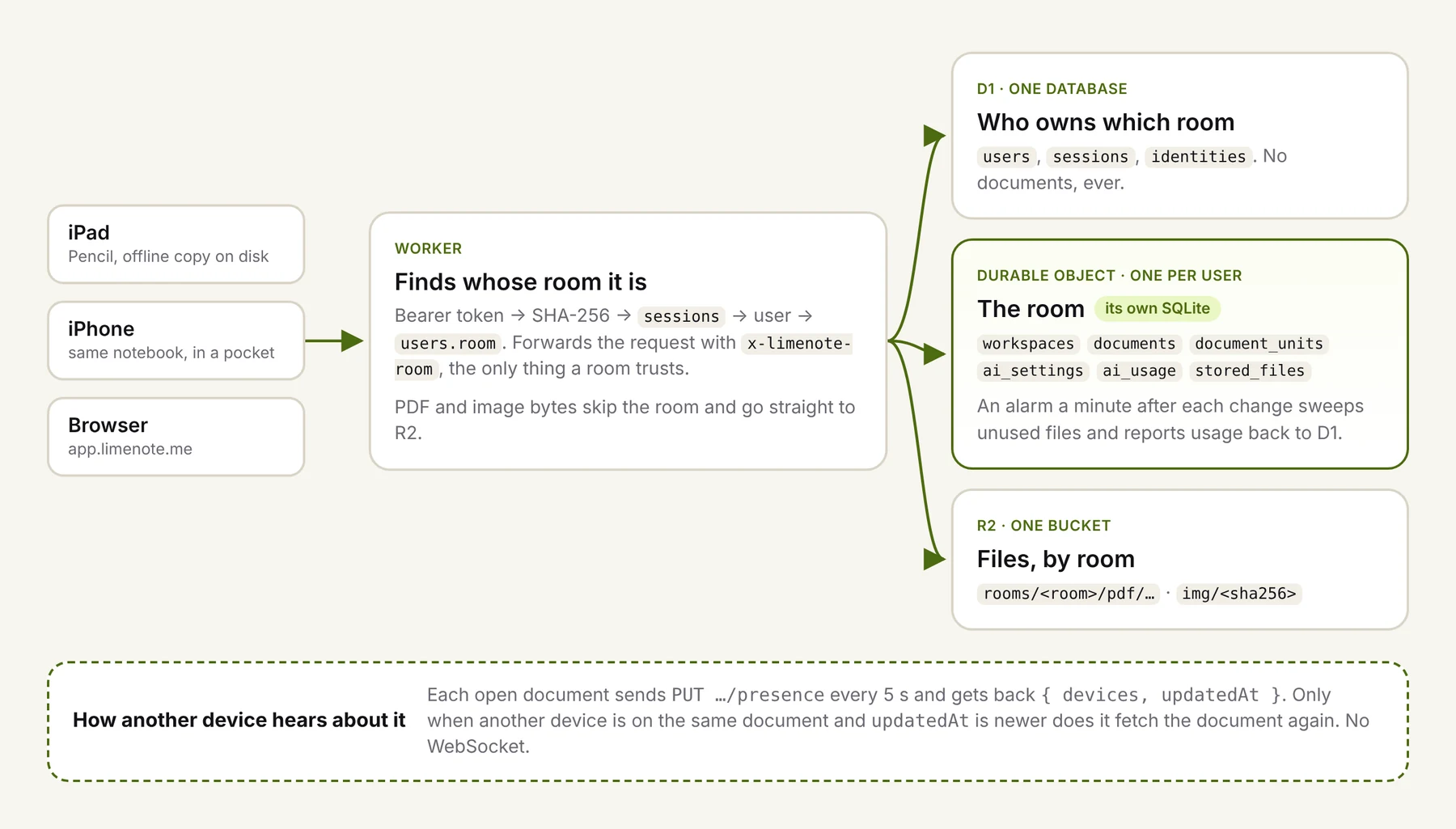
Limenote's backend has no Postgres, no Redis and no WebSocket server. It runs on four Cloudflare pieces: a Worker in front, one D1 database that knows who owns what, one R2 bucket for files, and one SQLite-backed Durable Object per person, which we call a room.
We've run it in production since launch. This post covers how the pieces fit, the few decisions that made it work, and the places where the design costs us. If you're building something where each person's data is mostly their own (notes, journals, personal CRMs, local-first-ish apps with a server), this shape is worth a look.
Finding the room
Every request carries a bearer token. The Worker hashes it with SHA-256, looks the hash up in D1's sessions table, and gets back a user with a room column. For a new account, the room name is simply the user id.
From there it's one call into the Durable Object namespace:
export function roomFor(rooms: RoomNamespace, room: string): RoomApi {
  return rooms.get(rooms.idFromName(room));
}

/** Sends a request to the user's room, overwriting the client's room headers. */
export function forwardToRoom(rooms: RoomNamespace, ref: RoomRef, req: Request) {
  const headers = new Headers(req.headers);
  headers.set('x-limenote-room', ref.room);
  headers.set('x-limenote-user', ref.userId);
  // …plus the storage quota for this user's plan
  return roomFor(rooms, ref.room).fetch(new Request(req, { headers }));
}
The room trusts those headers and nothing else. A request that reaches a room without them gets a 400, and the Worker always overwrites whatever the client sent. That one rule is the whole permission model: if the Worker sent you a request, it's for your room's owner.
Keeping the room name in a column instead of deriving it from the user id turned out to be useful, too. An admin can point a user at a different room without moving any data.
What lives where
| Store | Holds |
|---|---|
| D1 (one database) | users, sessions, identities: who owns which room. Never a document. |
| The room's SQLite (one per user) | workspaces, documents, document_units, stored_files, AI settings and sealed keys, AI conversations, the AI usage ledger, PDF uploads in progress |
| R2 (one bucket) | Every room's files under rooms/<room>/: PDFs by asset id, images by content hash, so each one is stored once |
The room reports its storage figures back to D1 after changes. That keeps cross-user views, like an admin list of accounts and their usage, possible without opening every room.
File bytes skip the room
Our first version streamed PDFs through the Durable Object. That was a mistake. A comment in our file routes records why:
A Durable Object streamed a 33 MB PDF out at about 60 KB/s, while R2 gives it in seconds.
So the room now decides and the Worker moves bytes. The room answers "is this your file, and which upload part is due next?" over RPC, and the Worker streams straight between the client and R2. Large PDFs go up as an R2 multipart upload in 8 MiB parts, written by the Worker, and the room only records which parts have arrived. If you take one thing from this post: keep big payloads out of your Durable Objects.
Sync without a WebSocket
This is the part people ask about. There's no live connection anywhere. Instead, each document that's open on screen reports in every five seconds:
PUT /api/workspaces/:ws/documents/:id/presence/:device
→ { devices: 2, updatedAt: "2026-11-06T05:58:41.112Z" }
The answer says how many devices have this document open right now, and when it last changed. A client fetches the document again only when both are true: another device is on it, and updatedAt is newer than the copy on screen. With one device open, the heartbeat costs one tiny request every five seconds and nothing else.
We measured it on a local server with two browser windows on the same whiteboard. Window A drew a circle, and its debounced save went out about 1.8 s in. Window B's next heartbeat, at 5.9 s, came back with a newer updatedAt. B fetched the document and showed the circle at 6.2 s.
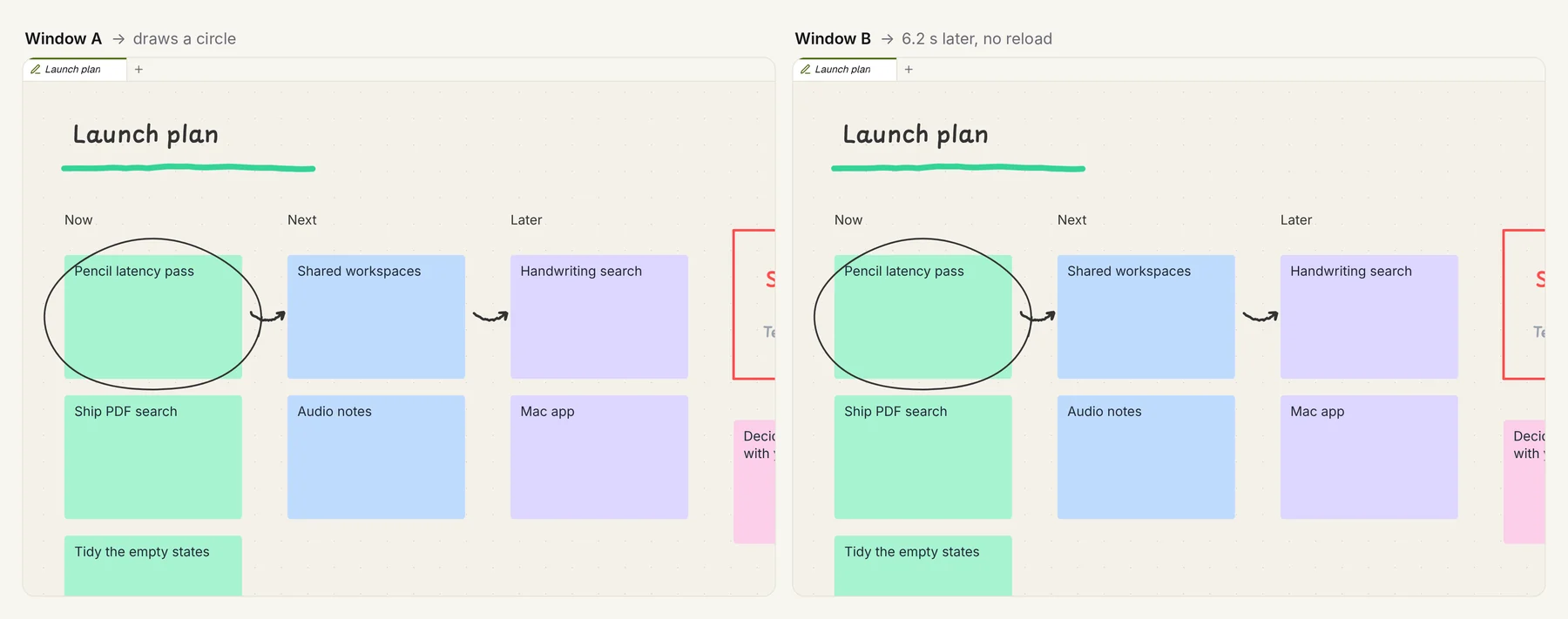
Why not a WebSocket? Because the problem is one person on two or three screens, not twenty people in one document. Up to five seconds of delay is fine when you're the only one writing. And a heartbeat does two jobs: it is the presence signal. The presence registry lives in the room's memory with a 15-second expiry and is never written to disk. After a restart, every open device simply reports in again.
Saving, and what happens when two devices disagree
Edits are saved as a debounced PUT (450 ms after the last change) carrying { upserts, deleteIds } plus document-level fields such as the camera and page layout. The server does an unconditional upsert per unit:
INSERT INTO document_units (id, document_id, …, data, updated_at)
VALUES (?, ?, …, ?, ?)
ON CONFLICT(id) DO UPDATE SET
  data = excluded.data,
  updated_at = excluded.updated_at;
So conflicts resolve as last writer wins, per whole unit. A unit is a stroke, a sticky note or a shape. Two devices moving the same sticky note at the same moment will lose one move. For a single person, that almost never happens. For real collaboration it would be unacceptable, and you'd want CRDTs.
The client side of a merge matters more than the server side:
- Take the remote units, but keep the local version of anything with a pending save, and don't bring back anything deleted locally that's still pending.
- Never merge in the middle of a gesture. If the pen is down, or text is being edited, wait.
Offline, per client
Decide early where unsent edits live on each platform. We made different choices:
- iOS writes each open document to disk along with its pending changes. A failed save is retried with backoff (5, 10, 20, 40, then every 60 seconds), and a document reopened from disk resends whatever was still pending.
- The web app keeps unsent edits in memory and flushes them when the tab is hidden or closed. Its IndexedDB copy is a cache of what the server already has, not an outbox.
Upkeep with alarms
A Durable Object can set an alarm, which is all the cron you need. A minute after any write, the room wakes up and does three things:
- Sweeps unused images in two passes. An image no longer used anywhere is marked first, and deleted only if it's still unused 24 hours later. The grace period exists for undo: delete a sticky note with an image, press undo an hour later, and the image is still there.
- Aborts PDF uploads left unfinished for 24 hours.
- Reports usage back to D1.
If anything is still waiting, it re-arms itself for twelve hours later.
Moving and deleting are easy
Because everything a person owns is in one room plus one R2 prefix, the hard operations become simple:
- Merging a guest notebook into an account after sign-in exports the guest room one workspace at a time and imports it into the account's room. Row ids are kept and inserted with
INSERT OR IGNORE, so an interrupted move can just run again. Files move first. - Deleting an account removes the R2 prefix, deletes the Durable Object's storage, then deletes the D1 rows. There's no hunting for a user's rows across thirty tables.
What it costs
- No cross-user queries. Anything you want to see across users (usage, counts) has to be pushed out of the rooms on purpose. We copy a few numbers to D1.
- Migrations happen per room, when a room opens. Every room runs
CREATE TABLE IF NOT EXISTSand copies legacy tables forward when it starts. That's fine, but you'll carry old shapes in your code for a long time. - One room is one place. A single very heavy user can't spill across machines. For notebooks that's a fine bet. For an analytics product it wouldn't be.
- Admin tooling has to go through RPC. There's no
psqlsession into everyone's data, which is a feature until you need it.
When not to copy this
Don't use this shape if people edit the same document at the same time, if you need search across users, or if one tenant can grow without bound. Do consider it if each person's data is mostly theirs, they use it from a few devices, and you'd rather never run a database server. For us, the whole backend is one Worker deploy.